Changelog
4.8.0 2026-11-16
Make your voice heard!
There is a short questionnaire about Kuvasz in general, which you can fill out anonymously. It takes only a few minutes, and your feedback is highly appreciated as it helps me to focus on the most important features and improvements in the future. You can find it here.
Thanks, Adam
Features
- Display names for the monitors: every monitor can have an optional
display-namenow, which is shown instead of its name on the Web UI, on the status pages and in the notifications. Unlike the name, it doesn't have to be unique, and you can change it at any time. This is especially useful if you manage your monitors in a YAML file: so far, the only way to change how a monitor was shown was to rename it, but a renamed monitor is a new one, so the old one was deleted with its whole history. Now you can keep the name, and change only the display name. The Web UI still shows the name next to the display name, because the YAML file, the status pages and the maintenance windows refer to the monitor by its name. The display name is also available in the API (displayName) and in the backups, the search by name finds it too, and the webhooks get a newmonitorLabelfield, which holds the display name, or the name if the monitor has no display name (#590). - Sender name for the email integration: an email integration can have a
from-namenow, which is shown as the display name of the sender in the "From" field of the notifications. If you don't set it, nothing changes: the address is used as the name, as before. The name is also returned by the API (fromName) and shown on the Integrations page. - More HTTPRoutes in the Helm chart: the chart can create more Gateway API routes with
extraHttpRoutes, besides the one inhttpRoute. This way, you can expose Kuvasz on more Gateways with different rules. For example, it can serve everything on an internal Gateway, and only a status page on a public one. Check the Helm deployment guide for an example (#589).
Fixes
- The HTTPRoute of the Helm chart was always out of sync in Argo CD: Kubernetes fills in the
groupandkindfields of the route's backend and Gateway, even if they are not set. The chart didn't set them, so tools that compare the chart with what is actually running in the cluster (like Argo CD) always saw a difference. The chart sets these fields now for the backend, and for the default Gateway (used whenhttpRoute.parentRefsis empty). Nothing changes in your cluster. If you set your own values for the route, likehttpRoute.parentRefsorhttpRoute.extraRules, check the Helm deployment guide for the fields to add to them (#587). - The Helm chart changed the admin password on every upgrade: if you didn't set
auth.adminUserorauth.adminPassword, the chart created new random values for them every time you ranhelm upgrade. So the credentials you got after the install stopped working, and the pod restarted on every upgrade. Now the chart creates them only once, and keeps them on upgrades. If you use a tool that creates the manifests withhelm template(like Argo CD), the chart can't read the existing values, so set them yourself, or use your own Secret. Check the Helm deployment guide for the details (#588). - The minimum Helm version was wrong in the documentation: the Helm deployment guide said that you need Helm 4, and the README of the chart said Helm 3.2.0. The chart is published to an OCI registry, and Helm can install charts from there without extra settings only from version 3.8.0. So the minimum version is Helm 3.8.0 now in both places, and Helm 4 works too.
4.7.0 2026-11-06
Features
- More than one recipient for an email integration: the
to-addressof an email integration can have several addresses now, either as a list in your YAML file, or as one value with the addresses separated by commas (handy for environment variables). By default, every recipient gets an email of their own, so they don't see each other's addresses, and one wrong address doesn't stop the others from getting the email. If you'd rather like to send one email with every recipient in its "To" field, disable the newseparate-emailsoption. Your existing email integrations keep working without any change. In the API response of the integrations, the newtoAddressesfield lists the recipients, andseparateEmailsshows how they get the emails. ThetoAddressfield is deprecated: it still works, and it contains every recipient, separated by commas.
Fixes
- Sending emails without encryption was not possible: the documentation said that the
SMTPtransport strategy sends emails without encryption, but it actually switches to an encrypted connection (STARTTLS) whenever the mail server offers it. So, if your mail server offered encryption with a self-signed certificate, or with one from your own certificate authority, Kuvasz did not trust it, and failed to start. If you want to send emails without encryption, even if the server offers it (e.g. on a local network), use the newSMTP_PLAINtransport strategy. TheSMTPone works as before, and its documentation is fixed too (#577).
4.6.0 2026-10-25
🚀 To Infinity and Beyond!
This release brings significant performance improvements. For the average user (with a few hundred monitors), Kuvasz was already blazingly fast, but there were a few warning signs, especially around the UX. Leaving out pagination and proper filtering from the UI and the API was a deliberate decision at the beginning, to keep everything as simple as possible. However, being fast and usable with 100 monitors doesn't mean that it also works with 5,000.
This time, Kuvasz (and the PostgreSQL database under it) was benchmarked under really heavy load (the benchmark is publicly available in the repository) to make sure that it can handle enterprise-grade volumes too. The result is a proper sizing guide, which also summarizes the findings of these initial benchmarks and how they were run.
From now on, it doesn't matter whether you have 5 or 5,000 monitors: everything will be as snappy as possible. And a hint: Kuvasz won't be hungry either. With up to 1,000 monitors, the default setup works without any problem, and if you'd like to run 5,000 monitors, 1.5 GB of memory dedicated to it is more than enough!
Watch out for the changes!
There are no breaking changes in this release, but a few API endpoints got deprecated, and a few things behave a little bit different than before. Make sure that you read the documentation before you upgrade!
Features
- Pagination & filters for almost everything, almost everywhere: on the Web UI, the lists of the monitors, the status pages, the maintenance windows and the incidents show 25 items per page by default (10, 50 or 100 if you prefer), so they stay quick with thousands of items too. You can search them by name, filter them (e.g. the monitors by category, by whether they are enabled or paused, and by their status, the incidents by their type and period), and sort them by clicking the column headers. The filters, the order and the page are part of the address of the page, so a filtered list can be bookmarked or shared. The incident lists on the details pages of the monitors are paged too, and they link to the incidents page, filtered by the monitor.
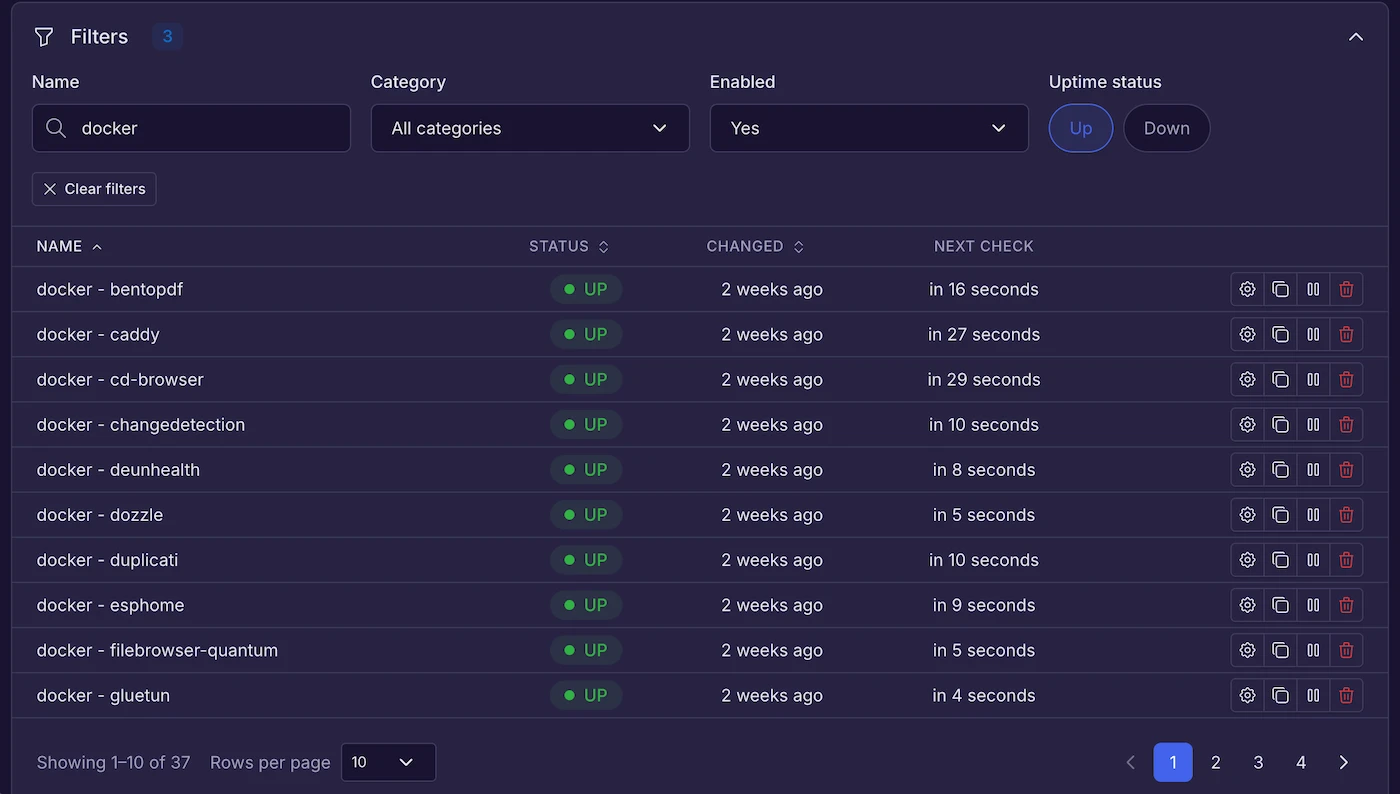
In the API, the new /api/v3 endpoints return the monitors of every type, their uptime and SSL events, the incidents (of every type, or of one type only), the status pages and the maintenance windows page by page, and can sort them (e.g. by name, status or date, in both orders) and search them by name. The full lists of /api/v2 keep working as before, but they are deprecated, so please switch to the /api/v3 ones. The MCP server's list tools return one page at a time too (25 items by default), so a large installation no longer fills the assistant's context with every monitor at once.
- Any time range on the charts of the monitors: on the details pages of the monitors, the charts and the numbers above them (e.g. the average and the highest response time) can show any time range now, not only the periods of the period selector (the last 24 hours is still the default). Pick the start and the end of the range with the date pickers, or select a part of a chart with the mouse to zoom in to it. Picking a period again goes back to it. The numbers above the charts are always calculated from every check of the range. The period selector of the charts got shorter periods too: the last 5, 15 and 30 minutes.
Improvements
-
Virtual thread scheduling is always on: the scheduled checks run on virtual threads for everyone now, so the
USE_VIRTUAL_THREAD_SCHEDULING(app-config.use-virtual-thread-scheduling) setting is not needed anymore, and it's ignored if it's still set. ThevirtualThreadSchedulingEnabledfield of the settings API response is deprecated and alwaystrue, and it is removed from the MCP settings tool and the Settings page. -
Charts that stay fast with a lot of history: a chart shows at most about 1,000 points, however long the period or the range is, and however often the monitor is checked. The checks of a period are grouped into equal time slots, and a point is the average of its slot, with a band around it from the lowest to the highest reading, so a short spike stays visible on a long period too.
-
Faster monitor details pages, status pages and daily cleanup with a lot of history: the tables that keep the response times and the other metrics of every check got better indexes. With about 1,000 monitors and a month of history, the details page of an HTTP monitor loaded about 4 times faster in our tests, the ones of the TCP, ICMP, DNS and Docker monitors about 20 times faster, and the nightly cleanup of the HTTP history went from almost 4 seconds to a quarter of a second. With 5,000 monitors and a month of history, the 30-day averages of 25 monitors on a status page took about 0.2 seconds instead of up to 6 seconds, and the 30-day statistics of a single HTTP monitor about 15 milliseconds instead of 3 seconds.
-
Dashboard and status pages that stay fast with a lot of history: the uptime figures of the dashboard, the statistics of the monitors and the uptime history of the status pages are now added up by the database. Before, Kuvasz loaded every uptime event of the period into its memory first. With 5,000 monitors and a month of history, a few people looking at the 30-day dashboard at the same time could fill the memory of Kuvasz and stop it from checking the monitors. The figures themselves are exactly the same as before.
-
Faster restarts with a startup cache in the Docker image: the image now contains a cache, which is made while the image is built, by starting Kuvasz and opening its pages. With it, Kuvasz starts about twice as fast: with 1,500 monitors, about 10 seconds instead of 21 with 1 CPU, and about 40 seconds instead of 72 with half a CPU in our tests.
-
Lighter status page and maintenance window pages with a lot of monitors: the forms of the status pages and the maintenance windows load the list of the monitors when you open them. The monitor and category pickers of the forms show the first 100 matches, and tell you when there are more. Type to find the rest: the search still covers every monitor and category.
-
Cookies are kept along the redirect chain: when an HTTP monitor follows redirects, the cookies set by the responses of a check are sent back on the later hops of the same chain, like a browser would. Some sites (typically behind a CDN like Cloudflare) redirect a client without a cookie to the very same URL (or back to it through another one), setting e.g. a session cookie on the way, which was detected as a redirect loop so far. Such a revisit is followed once more with the new cookies now, instead of failing the check (#546). The cookies are only sent back to the origin (scheme, host and port) that set them, and they're never kept between the checks.
Fixes
- OIDC login recovers when the provider was down at startup: if the OIDC provider could not be reached while Kuvasz was starting (e.g. both were restarted together, and the provider came up later), the OIDC login stayed broken until Kuvasz was restarted too. Now it recovers by itself as soon as the provider becomes reachable, without a restart.
4.5.0 2026-10-14
Features
🐳 Docker monitoring
Docker monitors ask the Docker daemon itself whether a container is running and healthy, so they catch what a port check misses: crash loops, OOM kills, paused containers, failing healthchecks, and containers without any port at all. The errors tell you what actually happened, e.g. "The container exited (137) after it was OOM killed", and the image of the container is recorded with every incident. The restart count is recorded as well, and you can get alerted when it goes up. With metrics history enabled, the CPU and memory usage of the container is charted too.
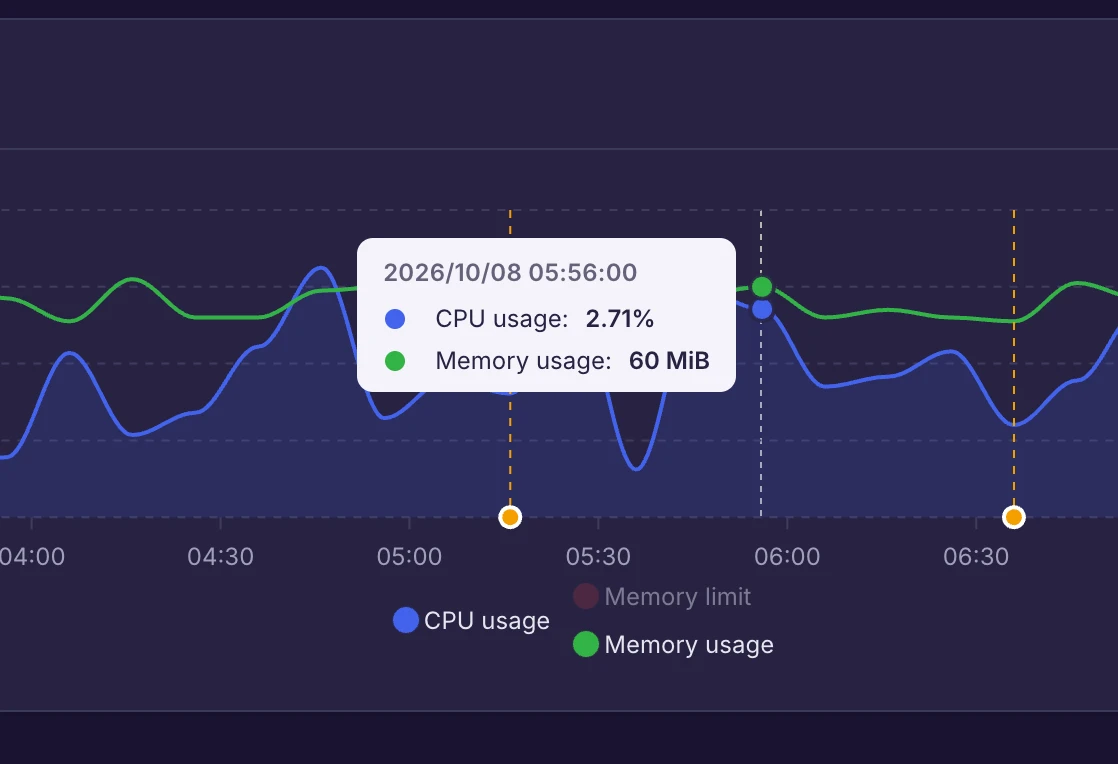
The daemons are configured as named Docker hosts in your configuration file: the local socket, a socket proxy, or a remote daemon over TCP with (mutual) TLS, from Engine 19.03 onwards (see the compatibility matrix).
Docker monitors are fully integrated across Kuvasz: they're manageable via the Web UI, REST API, or YAML, participate in incidents, uptime stats, status pages, maintenance windows, notifications, the metrics exporter, YAML import/restore, and are exposed to AI assistants through the MCP server.
🤖 Slack Bot integration
The new Slack Bot integration posts the notifications to a Slack channel as a Slack app, instead of an incoming webhook. It keeps every incident and maintenance in a thread of its own, so a flapping monitor doesn't flood the channel anymore: the first message of the thread always shows the current state with its color (e.g. it turns green once the incident is resolved), and the bot can also react to it. The notes of the incidents are posted into their threads too (public ones only by default). The messages are color-coded by the severity of the event, and if Slack refuses one (e.g. because of a missing scope, or the bot not being in the channel), the error tells you how to fix it. It supports the usual global and excluded events settings, and it can be tested right from the UI.
🔀 Checking monitors through proxies
HTTP and TCP monitors can be checked through an outbound HTTP or SOCKS5 proxy now (with or without authentication), e.g. a corporate egress proxy, or a SOCKS5 proxy into a private network (like ssh -D through a bastion host).
Using the connectivity check?
Its probe never goes through a proxy, so make sure to read Proxies and the connectivity check before enabling both.
📝 Incident notes, details with a timeline, and incidents on the status pages
Every incident has its own details page now, with a timeline of its story: its start, the integrations that were notified about it (and about its resolution), its resolution, and the notes you add to it. A note has a status (Investigating, Identified or Resolved), a plain text content, an optional custom time, and it can be marked as public. Notes are manageable via the Web UI, the REST API and the MCP server.
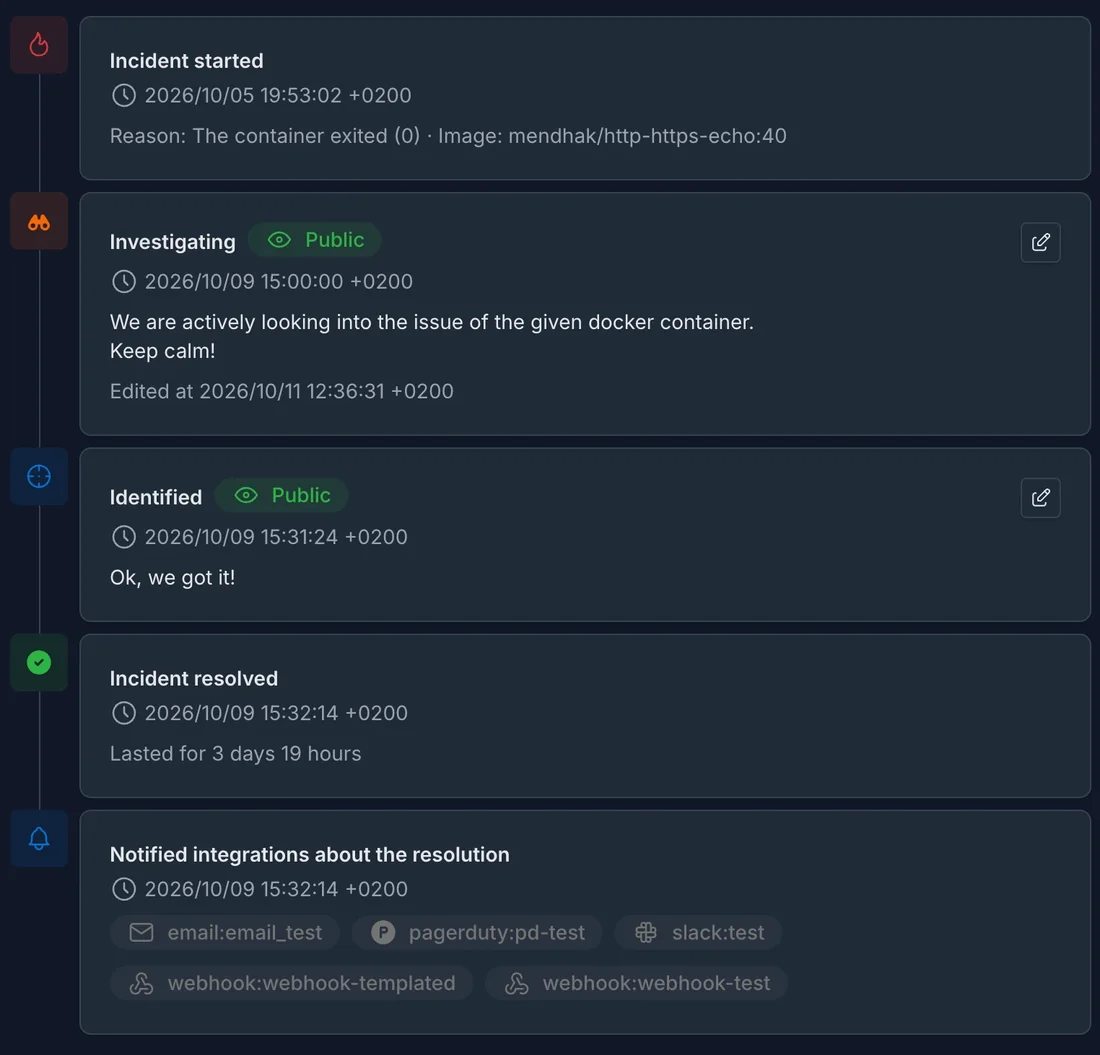
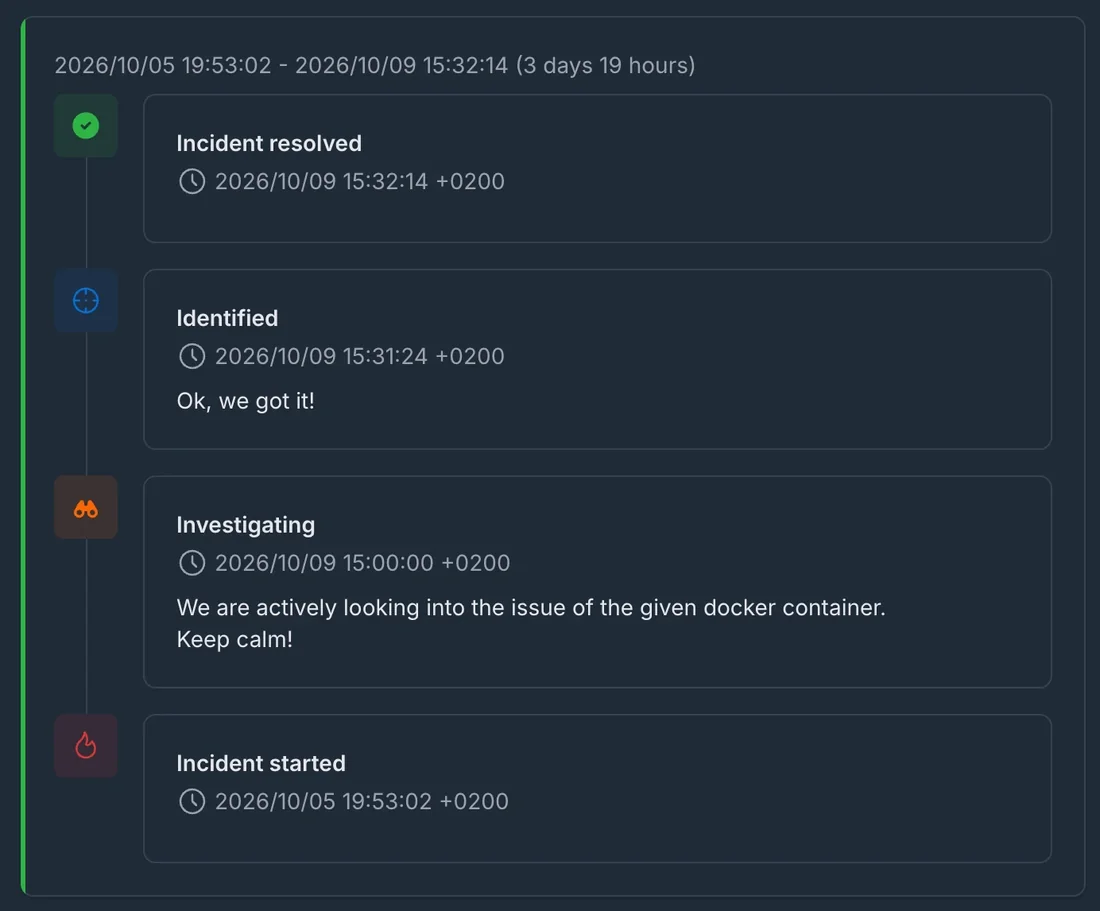
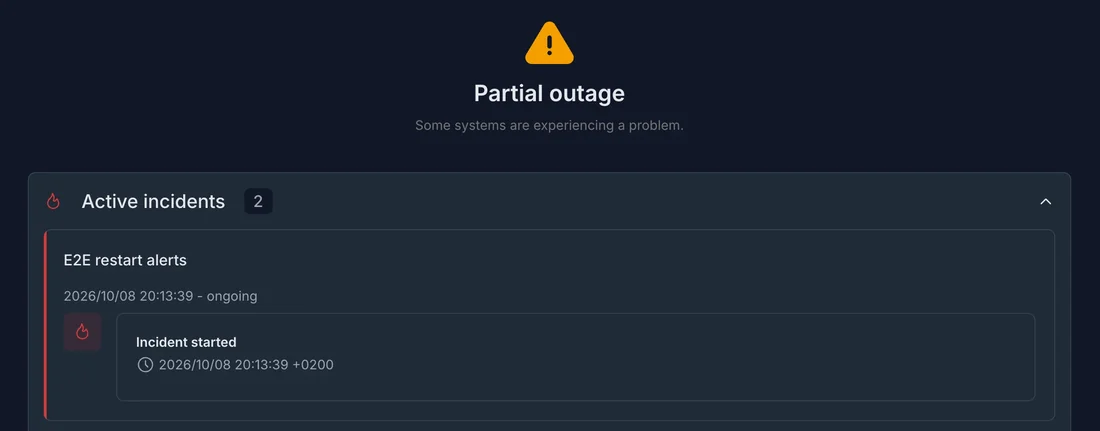
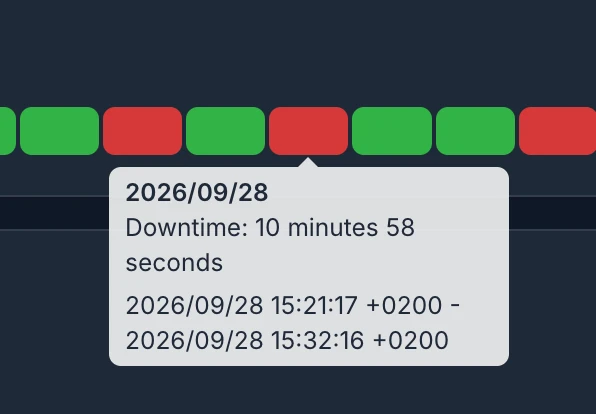
The status pages got a lot more talkative too: the active and the recently resolved incidents are listed right below the overall status, with their public notes, every monitor card counts its incidents and lists them on click, and hovering a day tells its downtime and the time span of its incidents. Everything else about the incidents (e.g. the errors of the checks, or the private notes) stays private. The pages refresh themselves in place instead of reloading the whole page.
🖥️ A fully redesigned dashboard
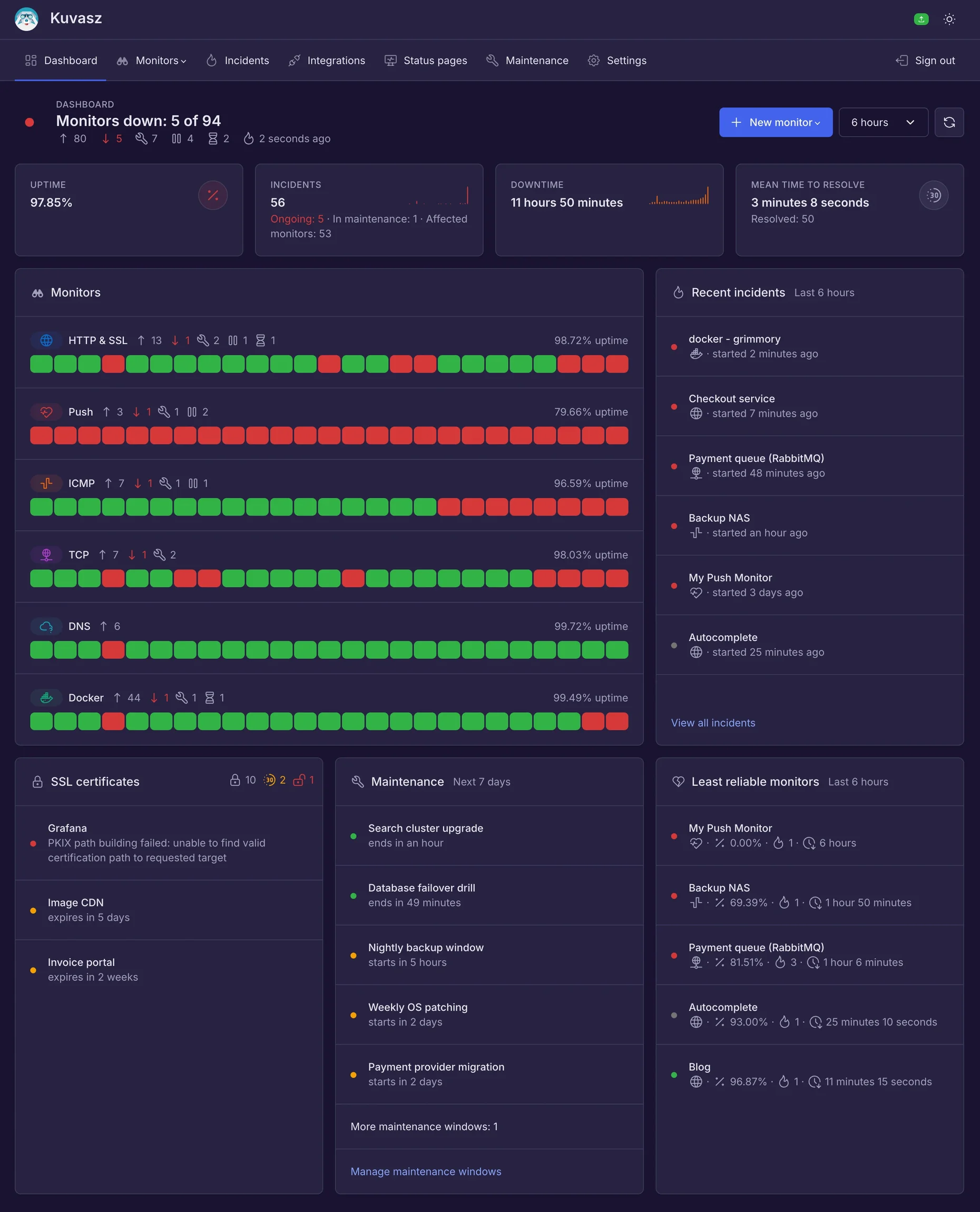
Instead of repeating the same set of stat cards for every monitor type in a boring way, the brand new dashboard gives you a single overview of all of your monitors now: a verdict in the header about what needs your attention, the key figures (uptime, incidents, downtime and mean time to resolve), an uptime timeline per monitor type, the recent incidents (both ongoing and resolved), the certificates that need your attention, the active and upcoming maintenance windows, and the least reliable monitors of the period. The period it covers can be picked with a period selector (from the last hour up to the last 30 days).
🔌 Connectivity check
When the host running Kuvasz loses its own outbound network access — an ISP blip, a router reboot, a restarted Docker network, a flapping VPN — every monitor fails at the very same moment, and you get an incident storm, a matching recovery storm and permanently polluted uptime percentages, all because of something that has nothing to do with the services you monitor.
The new connectivity check periodically dials a few well-known endpoints, and while none of them can be reached, it suspends every check Kuvasz initiates on its own — no checks, no events, no alerts — exactly the way a maintenance window does.
It's disabled by default
Kuvasz is often run on egress-filtered or LAN-only networks, where the default targets can never be reached, and enabling the feature there would make it silently stop monitoring everything. Turn it on deliberately with ENABLE_CONNECTIVITY_CHECK, and adjust the targets if your network filters outbound traffic.
Improvements
- Interactive install script: on Linux and macOS, the new install script sets up the Docker Compose stack for you: it asks for the credentials, the database, the timezone, the authentication mode, the API keys, the MCP server, and whether to run as non-root or mount the Docker socket, then writes the files and starts Kuvasz. No more default secrets left in the compose file by accident.
- Connecting to PostgreSQL through its unix socket: if
DATABASE_HOSTpoints to the directory of the socket (e.g./var/run/postgresql), Kuvasz connects through it instead of TCP, just likepsqldoes. So when your database runs on the same host, you can mount its socket into the container and don't need to expose PostgreSQL on the network at all. - Virtual thread scheduling (experimental, disabled by default): the scheduled checks can run on virtual threads now, so a lot of unreachable TCP, DNS or Docker targets waiting for their timeout can't delay the checks of your other monitors anymore.
- UI refresh: Tabler UI has been bumped to 1.6.x, which brings sharper focus indicators and a lot of small visual improvements, while keeping the familiar color scheme. If you'd like a different one, you can pick a gray palette and an accent color on the Settings page now: your choice is saved in your browser (just like the dark/light mode). The public status pages aren't affected by it, but each of them can get its own gray palette instead (the default one included). The start of a one-off maintenance window is picked with a proper date and time picker now (it can still be typed in, as
YYYY-MM-DD HH:mm, or with seconds, asYYYY-MM-DD HH:mm:ss, which the picker itself can't select). - A more locked-down Helm chart: the chart runs Kuvasz with a non-root group too (
1000:1000, instead of1000:0), and with a read-only root filesystem by default. Since the only place Kuvasz writes to is/tmp, the chart always mounts anemptyDirvolume there. If you've added your own/tmpvolume viaextraVolumesandextraVolumeMounts, remove it before upgrading, otherwise Kubernetes rejects the deployment because of the duplicate mount. See the security context of the chart for the details, including a fix for ICMP monitors on older container runtimes. - Lower memory usage on the database side: Kuvasz keeps only 2 idle database connections open instead of 10, which saves a few megabytes of memory on your PostgreSQL server while there's nothing to do. The pool still grows (up to 10 connections) when it's needed.
- More aliases in the YAML configuration: if you share common settings between your monitors with anchors and merge keys (e.g.
<<: *http-monitor-defaults), more than 50 references to them made Kuvasz fail to start with aNumber of aliases for non-scalar nodes exceeds the specified max=50error. The limit can be raised now with the newYAML_MAX_ALIASESenvironment variable (50 by default).
Fixes
- Shutting down could hang while monitors were failing: on shutdown, Kuvasz waited for every running check to finish, while the checks of the other monitor types kept starting new ones, and the finished ones even re-scheduled themselves. With enough slow or unreachable targets, it never stopped on its own, and Docker (or whatever runs it) had to kill it. Now no new check starts once the shutdown begins, and the running ones get at most 5 seconds to finish.
- Markup in the Slack and Telegram notifications: the names of the monitors and maintenance windows, their URLs and descriptions, the reasons of the invalid certificates, and the changed DNS records are escaped now, so they're shown as they are. Before, a
<,>or&in them could garble the message, make Telegram reject it altogether (e.g. a monitor calledAPI <prod>), or even turn a DNS record into a link or a mention (e.g.<!channel>) in Slack.
Docs
- Added a recipe about reaching a proxy over TLS with a stunnel sidecar, since Kuvasz can't talk TLS to a proxy itself.
- Added a new recipe about running Kuvasz as a non-root user (optionally without any capabilities, and with a read-only root filesystem), including the things to look out for with ICMP and Docker monitors. The Docker Compose example comes with the related settings too, commented out.
4.4.0 2026-09-15
Features
🗂️ Monitor categories
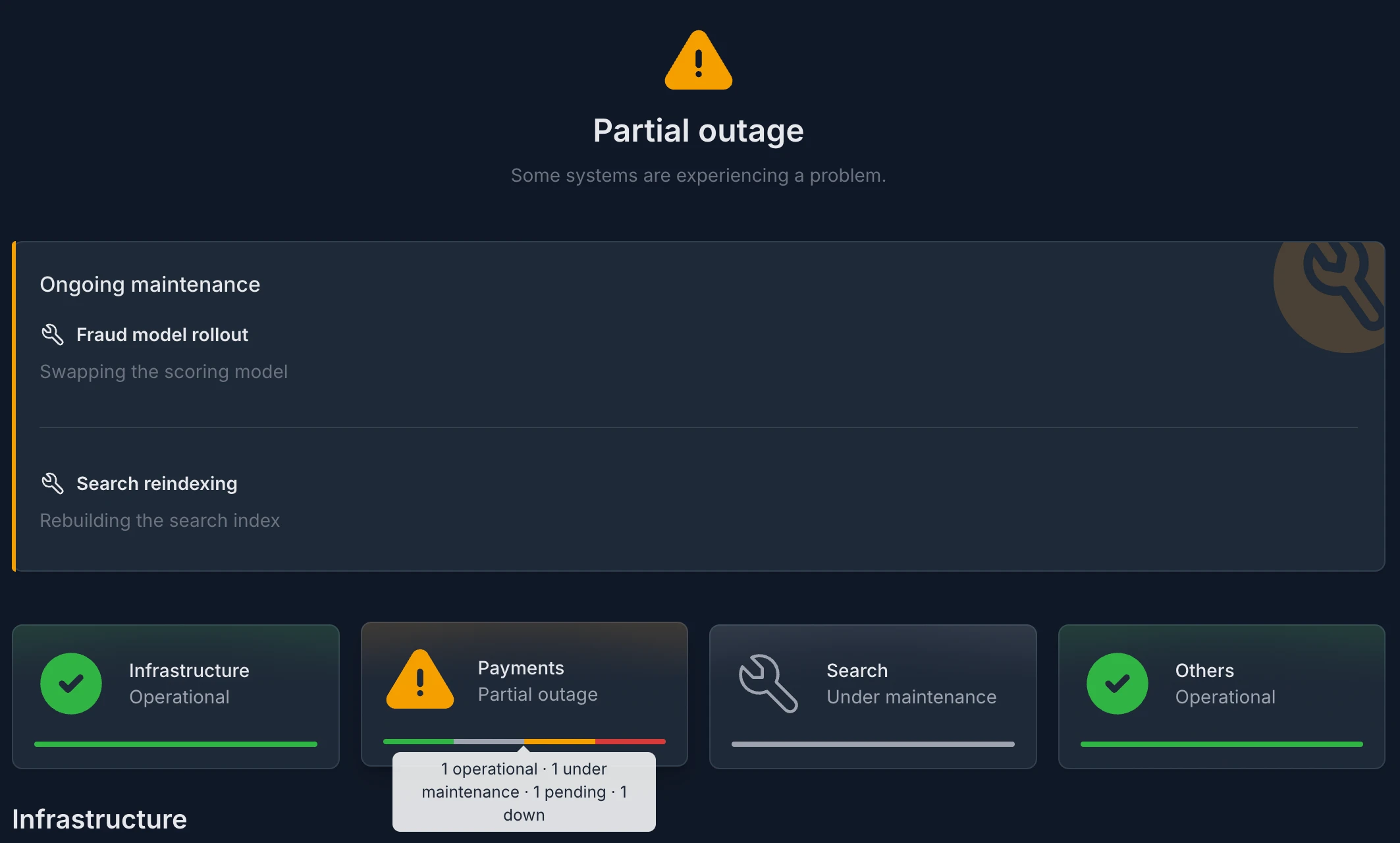
Every monitor can have an optional, free-form category now — a product, a service, a team, whatever you group by. It doesn't just label them, it selects them:
- Status pages can be defined by category instead of listing their monitors, so a page follows your monitors as you tag and re-tag them. Categorized monitors are rendered in one section per category, each with a card showing its aggregated status and a breakdown of its monitors. "Display categories" turns that grouping off if you'd rather not reveal it publicly.
- Maintenance windows can cover a whole category, so you put an entire product into maintenance without enumerating what is in it.
Both selectors are additive with the explicit monitor list, and a category no monitor belongs to yet is kept as you configured it.
The monitor lists themselves can be filtered by category too, on the Web UI and through the REST API alike.
📈 Metrics charts
The metrics on the monitor details pages got some love as well:
- The incidents that started or got resolved in the displayed time range are marked on the charts.
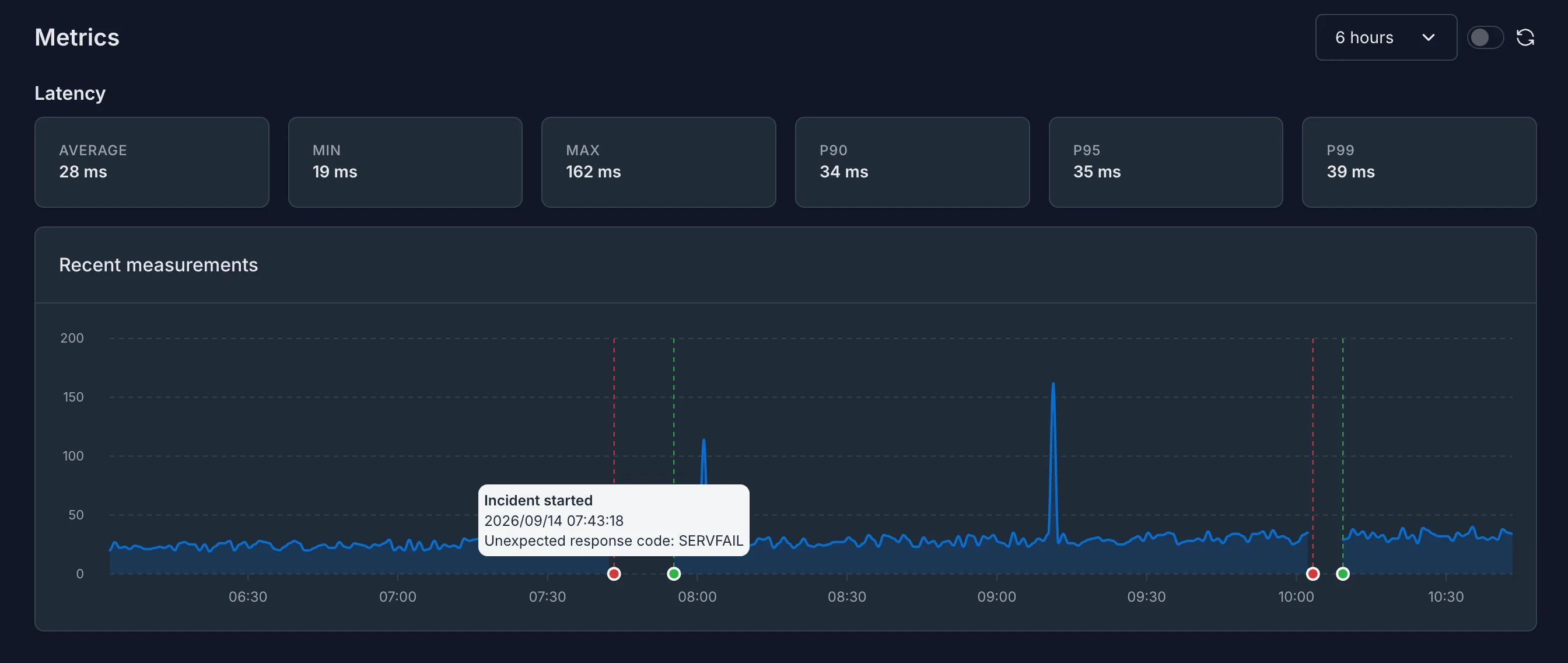
- The metrics can be displayed for a selectable period, from the last hour up to the last 30 days (the last day by default).
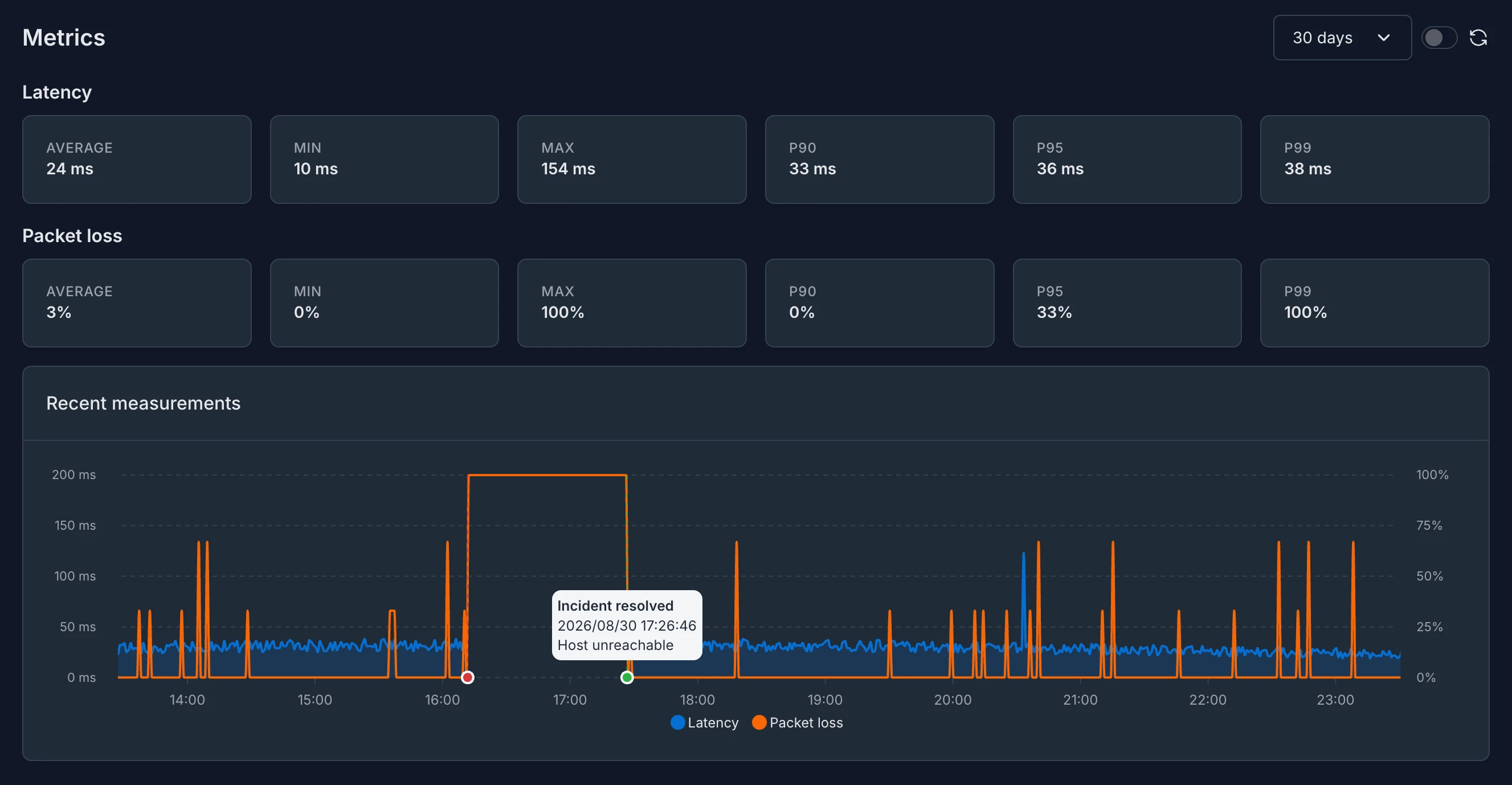
- The latency and the packet loss of ICMP monitors are drawn on a single chart, each of them with an axis of its own.
✏️ Editing monitors, status pages and maintenance windows from their lists (status pages and maintenance windows are also clonable from now on!)
Every row of the monitor, status page and maintenance window lists got a configure button, which opens the settings of the given entity without leaving the list, and saving them brings you back to the very same list. Going through a bunch of them one after the other doesn't take a detour to their details pages anymore.
Just like monitors, status pages and maintenance windows can be cloned from their lists as well.
Improvements
Tabler UI has been bumped to 1.5.x which brings a lot of small visual improvements.
Security
- Custom request headers were sent to every origin a redirect pointed to: an HTTP monitor that follows redirects attached its request headers to every hop of the redirect chain, so a secret in them - an
Authorizationheader or an API key, for example - reached whatever origin the monitored URL (or any later hop) redirected to, even over plain HTTP. From now on, the custom request headers are only sent to the origin (scheme, host and port) of the monitored URL, and they're withheld from every hop on a different origin. The default headers added by Kuvasz and the request body are not affected. If a monitor really needs its headers on another origin, the new cross-origin header propagation option restores the previous behavior. It's available on the Web UI, through the REST API, over MCP and in the YAML config (cross-origin-header-propagation) as well.
Check your monitors that are redirected to another origin
The option is disabled for every monitor, including the already existing ones, the ones defined in the YAML config and the ones restored from an older backup. If a monitor relies on sending its custom headers to a different origin (e.g. it's redirected from http to https, or to another domain), it may go DOWN after the upgrade. Enable the option on it explicitly to restore the previous behavior.
4.3.2 2026-09-04
Fixes
- Importing monitors left the exported metrics describing the state before the import: after a YAML import, the exported metrics still reported the monitors as they were beforehand. A monitor deleted by the import kept being exported forever, frozen at its last known value; a renamed one kept its old
nameandtargetlabels, and picked up a second series under its new name as soon as it was checked again; and a monitor the import disabled - or turned the SSL check off on - went on being exported, even though a disabled monitor never is otherwise. Only a restart cleaned this up. The exported metrics now follow an import immediately. - Status pages could keep showing an outdated set of monitors: the cached status page data wasn't dropped when the monitors behind it changed - neither on a YAML import, nor when a monitor was created, edited or deleted on the UI, through the API or over MCP. A page could serve a monitor set that didn't exist any more, or leave out one that had just been added, until its cache expired on its own. Every one of these changes now invalidates it right away.
- Turning the latency or the metrics history off in an import kept the already recorded logs: doing the very same thing on the UI or through the API deletes them, because they aren't reachable any more once the history is off. An import left them behind in the database instead, and they reappeared the moment the history was turned back on. They are now dropped either way.
- Importing a push monitor kept its recorded failures even when its failure counting changed: the same problem the previous release fixed for the UI and the API. The failures recorded so far were counted against the monitor's previous settings, so once an import changed its heartbeat interval, its grace period or its failure count threshold, they weren't comparable to the new ones any more. An import now clears them too, exactly like an edit does.
4.3.1 2026-08-31
Fixes
- Push monitors burned through their failure count threshold in seconds: a missed heartbeat was counted as a new failure on every check, and since Kuvasz evaluates the push monitors every 5 seconds, a failure count threshold higher than 1 only delayed the alert by a few seconds, instead of tolerating as many missed heartbeats as it was set to. From now on every missed heartbeat counts only once.
- Push monitors could go down right after a maintenance window or a restart: the deadline of the next countable missed heartbeat was calculated from the last heartbeat only, so whenever that heartbeat was already long overdue - after a maintenance window of the monitor, after a restart or a longer downtime of Kuvasz itself, or after a monitor was paused for a while - the checks credited all the heartbeats missed in the meantime at once, burning through the whole failure count threshold within seconds. A missed heartbeat is now counted at most once per heartbeat interval, no matter how far behind the last heartbeat is.
- Changing the failure counting of a push monitor resets its pending failures: the failures recorded so far were counted against the monitor's previous settings, so they weren't comparable to the updated ones - lowering the failure count threshold below the number of already recorded failures even left behind a counter that nothing consumed any more, delaying the detection of the next outage. Updating the heartbeat interval, the grace period or the failure count threshold of a monitor now clears them, and its failure counting starts from scratch. Every other setting (its name or integrations, for example) leaves the already recorded failures intact, so editing a monitor during an outage doesn't delay its alert.
4.3.0 2026-08-31
Features
Three new integrations joined the family, so you can reach more places without hand-crafting a webhook payload for them:
- Microsoft Teams posts Adaptive Cards to a channel or a chat, color-coded by the severity of the event. It's built on the Workflows app, so it isn't affected by the retirement of the Microsoft 365 (Office 365) Connectors.
- Apprise hands your notifications to a self-hosted Apprise API instance, which forwards them to 80+ services at once — ntfy, Gotify, Matrix, SMS providers and many more — so you don't have to wire them up one by one.
- Pushover sends push notifications to your phone, tablet and desktop, and can escalate an outage to its emergency priority, which repeats until someone acknowledges it.
All three behave like every other integration: they can be global or assigned to specific monitors and maintenance windows, their events can be filtered with excluded-events, and they're testable right from the UI, the REST API and the MCP server. If you were reaching any of them through a custom webhook until now, you can drop the payload template and replace the whole setup with a handful of properties.
Security
- Relative redirects were resolved against the wrong hop (GHSA-jq3w-22qh-gf8w): when an HTTP monitor followed a chain of redirects, a relative
Locationheader was always resolved against the monitor's own URL instead of the URL of the hop that actually returned it. A chain likehttps://a.example → https://b.example/deep/path → Location: /nextwas followed tohttps://a.example/nextrather thanhttps://b.example/next. Besides checking a completely different resource than the one the hop pointed at, this let an intermediate hop steer the check to an arbitrary path on the monitored origin - with the monitor's own request method, body and custom headers attached - even when that origin is only reachable from Kuvasz itself. Relative locations now follow RFC 9110 and are resolved against the hop that returned them. Reported by @CaptBoykin.
Enhancements
- Redirect chains are capped: the new
app-config.http-check-max-redirectsproperty (10 by default) limits how many redirects a single HTTP check follows. Redirect loop detection only recognizes a repeated URL, so a chain where every hop is different was previously followed without an upper bound. Exceeding the limit now marks the monitor DOWN with a dedicated error.
4.2.0 2026-08-10
Features
TCP and DNS monitors are here!
-
You can now create TCP monitors that check whether a TCP service is accepting connections — a database, an SMTP or SSH server, a message broker, a game server, or any other
host:portendpoint — by periodically opening a TCP connection to it. For each check Kuvasz measures reachability and connect latency, and marks the monitor as DOWN (notifying you through your configured channels) if the connection can't be established within the configured timeout or, when set, exceeds the optional latency threshold. -
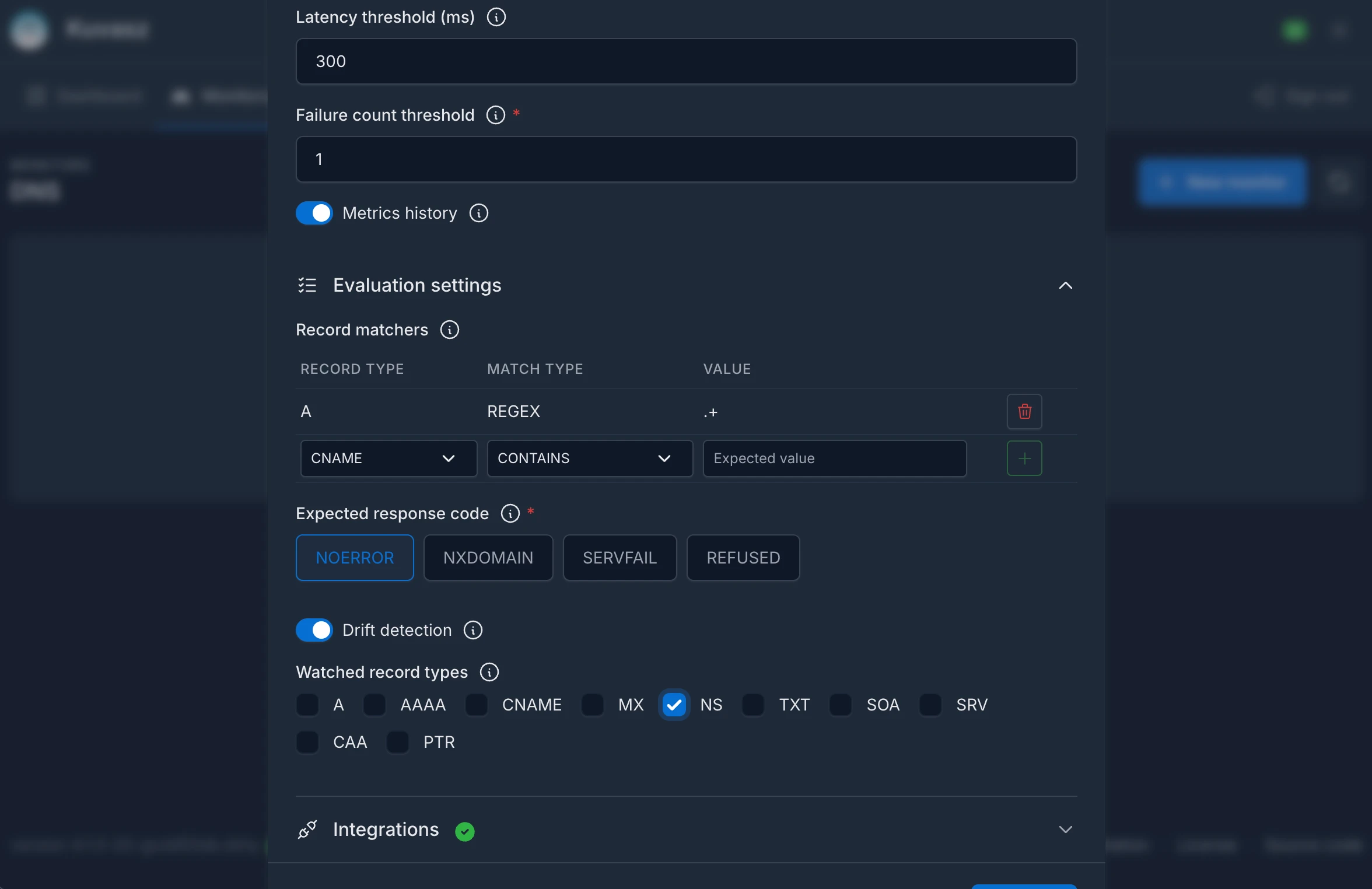
DNS monitors arrived as well! They check whether a name resolves, and you can assert on the records it resolves to. A monitor holds a list of record matchers (
A,AAAA,CNAME,MX,NS,TXT,SOA,SRV,CAA,PTR) matched asEXACT,CONTAINSorREGEX, can expect a specific response code (so "this name must not resolve" checks work too), and can query a custom nameserver overUDPorTCP. On top of that, an opt-in drift detection notifies you when the resolved records change, without flipping the monitor to DOWN. See the Managing DNS monitors section for further details.
Both new types are fully integrated across Kuvasz: they're manageable via the Web UI, REST API, or YAML, participate in incidents, uptime & latency stats, notifications (including generic webhook templating), the metrics exporter, YAML import/restore, and are exposed to AI assistants through the MCP server.
Enhancements
-
The UI got a facelift:
- the dashboard was cleaned up and its stat cards now use conditional colors, so a glance is enough to tell whether everything is fine.
- the columns of the monitor lists were streamlined with consistent sizing.
- fixed the positioning of the loading spinners on the UI.
-
Nicer empty states everywhere: the dashboard, the monitor lists, the incidents, the integrations, the maintenance windows and the status pages all have a proper empty state now.
- The Settings page was revamped: the read-only flags of your resources moved to their own "Editability" card, and the SMTP settings got a dedicated card as well, instead of being the only entry under the old integration settings.
- Faster status page details: the uptime statistics of the status pages (and of the
GET /api/v2/status-pages/{statusPageId}/detailsendpoint) are calculated with batched queries now, instead of querying the uptime events of every monitor one by one. The bigger your status page is, the more noticeable it is.
Fixes
- ICMP latest-latency metric: the
icmp-latest-latencyexporter now also updates when a monitor goes DOWN due to partial packet loss while some replies still arrived, instead of freezing on the last successful check. The exported gauge now stays consistent with the recorded latency history in this degraded state. - Case-insensitive sorting across the UI: monitors, maintenance windows, status pages and integrations were sorted by their name in a case-sensitive way, which pushed every lowercase name after the uppercase ones. They are ordered case-insensitively from now on.
Docs
- Documented the SMTP related environment variables (
SMTP_CONFIG_HOST,SMTP_CONFIG_PORT, and the rest): the SMTP configuration doesn't have to be provided via YAML, it can be set through environment variables as well. - Added a new recipe about keeping secrets out of your configuration file, covering both the
${VARIABLE_NAME}placeholders (with default values) inside the YAML, and splitting your configuration into multiple files viaMICRONAUT_CONFIG_FILES, so your secrets can come from a Docker secret.
4.1.0 2026-07-14
Features
The long-awaited maintenance window support is finally here! 🎉
-
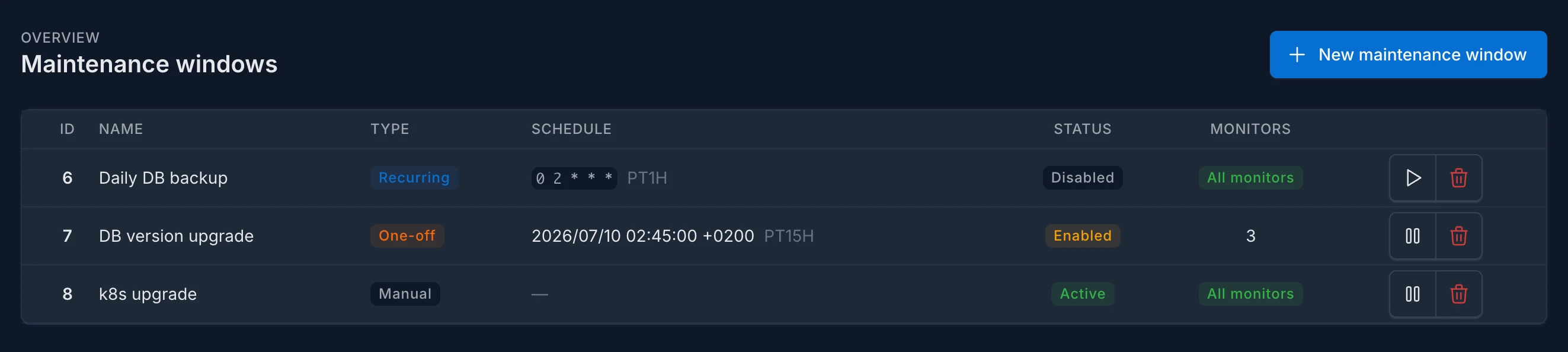
You can now schedule planned downtime so Kuvasz pauses the affected checks and suppresses false alerts while you do scheduled work. A window can be manual (toggled on and off by hand), recurring (a
cronexpression +duration), or a one-off (astarttimestamp +duration), and can be scoped to specific monitors or made global. Assigned integrations receive dedicated start and end notifications, and windows can optionally be shown on your status pages. Manageable via the Web UI, REST API, or YAML, and exposed to AI assistants through the MCP server. -
YAML import/restore is now available for your whole configuration: on top of monitors, you can restore maintenance windows and status pages from exported YAML backups, both through the Web UI and the REST API. This makes it easy to migrate or recover an entire Kuvasz setup. To try it out, head to the "Settings" page and click the "Backup & Restore" button! Thanks for the monitor imports to @visorcraft!

- Clonable monitors: you can now duplicate an existing monitor straight from the Web UI, so creating similar checks no longer means filling out the whole form from scratch.
Enhancements
- Helm chart: removed the hard-coded default image tags so the image tag correctly falls back to the chart version. Also, the chart now supports setting up OIDC authentication and its current state also reflects the latest changes related to API keys. See the Helm deployment guide for more details. Thanks for the contribution to @leofvo!
- A few custom Glance widget examples were added to the documentation.
- Added a proper robots.txt that prevents search engine from indexing anything but the public status pages (e.g. the login page of Kuvasz won't be indexed anymore in case you publicly expose your instance).
- The actual and the latest version of Kuvasz is not leaked on the login page anymore, by hiding the version update badge for non-authenticated users.
4.1.0-rc 2026-07-09
Features
-
YAML import/restore is now available for your whole configuration: on top of monitors, you can restore maintenance windows and status pages from exported YAML backups, both through the Web UI and the REST API. This makes it easy to migrate or recover an entire Kuvasz setup. To try it out, head to the "Settings" page and click the "Backup & Restore" button! Thanks for the monitor imports to @visorcraft!
-
Clonable monitors: you can now duplicate an existing monitor straight from the Web UI, so creating similar checks no longer means filling out the whole form from scratch.
Enhancements
- Helm chart: removed the hard-coded default image tags so the image tag correctly falls back to the chart version. Thanks for the contribution to @leofvo!
- The notification about a maintenance window's end doesn't contain the window's description anymore, because it doesn't really make sense to include it in there.
4.1.0-beta 2026-07-04
Features
The long-awaited maintenance window support is finally here! 🎉
-
You can now schedule planned downtime so Kuvasz pauses the affected checks and suppresses false alerts while you do scheduled work. A window can be manual (toggled on and off by hand), recurring (a
cronexpression +duration), or a one-off (astarttimestamp +duration), and can be scoped to specific monitors or made global. Assigned integrations receive dedicated start and end notifications, and windows can optionally be shown on your status pages. Manageable via the Web UI, REST API, or YAML, and exposed to AI assistants through the MCP server. -
Thanks to @leofvo, the Helm chart now supports setting up OIDC authentication and its current state also reflects the latest changes related to API keys. See the Helm deployment guide for more details.
Under the hood a lot of stuff was refactored (especially around notifications and status pages) to make this possible, and while the regression tests are extensive, it's still a huge change, so a beta release seemed like a better fit. Please give it a try and report any issues you find, so we can make the final 4.1.0 release as stable as possible!
4.0.1 2026-06-17
Fixes
- Push monitors no longer deleted on startup when a status page YAML config is present: a copy-paste bug caused the app to treat a non-empty status page YAML config as if push monitors were also configured via YAML. This triggered an import of an empty push monitor list on startup, deleting every externally (API/UI) managed push monitor.
4.0.0 2026-06-16
Features
- Built-in MCP server (experimental): Kuvasz now ships with a Model Context Protocol server that exposes your monitors and incidents as tools AI assistants can call directly. Enabled via the
ENABLE_MCP_SERVERenvironment variable (disabled by default), the server is available at/mcp. Supported tools cover listing, inspecting, creating, deleting and toggling your monitors, as well as querying incidents, status pages, the configured integrations, and other configs. Compatible with practically every MCP client via themcp-remotebridge. - OIDC authentication: as an alternative to the built-in username/password login, you can now authenticate the web UI against any OpenID Connect provider (Keycloak, Auth0, Okta, etc.). When enabled, the login page offers an OIDC login button, the form-based login is disabled, and the
ADMIN_USER/ADMIN_PASSWORDcredentials are no longer needed. - Optional & separated API keys: API key authentication is now fully optional — if you don't configure a key, key-based access is simply disabled and the REST API stays reachable only via a web UI / OIDC session. The REST API and the MCP server are now protected by two separate keys, so you can grant, rotate, or revoke MCP access independently from REST API access.
Chore
- The project has been upgraded to use Micronaut 5 and Kotlin 2.4.0 under the hood
3.11.0 2026-05-30
Features
- Webhook URLs are templatized now, so you can include dynamic values in the URL as well, based on the context of the event that triggered the webhook. For further details, please refer to the documentation.
- The HTTP method used for a given webhook can be configured now as well, so you are not limited to sending
POSTrequests, but you can choose the most appropriate method (GET, POST, PUT or PATCH) for your use case.
Documentation
- Documented the integration with the following external notification services:
- Signal
- Twilio SMS
- Pushover
- Home Assistant webhooks
- Google Chat
- Apprise
- Mattermost
- Rocket.chat
3.10.0 2026-05-23
Features
- Added Ping (ICMP) monitoring: you can now create ICMP monitors to check the reachability and latency of any host by sending ICMP echo requests to it. Configurable parameters include the number of packets per check, the per-ping timeout, and the packet loss threshold that triggers a DOWN event. See the Managing ICMP monitors section for further details.
- Published a separate, dedicated Home Assistant integration, named ku-hass that makes the integration with HA easier than ever.
Improvements
- Monitor lists are periodically updated on the UI, there is no need to manually refresh the pages to see the latest status updates
Fixes
- Fixed a UI bug that made the tooltips "burn in" in case a tooltip was visible during a data update
3.9.0 2026-05-08
Features
- Added a new property called
monitorDetailsUrlto the webhook messages (also available in the webhook templates asctx.monitorDetailsUrl), which is a relative URL to the affected monitor's details page on the UI. This allows you to easily include a direct link to the monitor's details page in your webhook notifications, so you or your team can quickly access more information about the incident and take necessary actions. - The webhook request headers can be templated from now on, so you can include dynamic values in the headers as well, based on the context of the event that triggered the webhook.
Fixes
- Fixed a bug in the webhook templating logic that caused templates fail to render in case the
ctx.monitorUrnvariable was referenced inside.
Docs
- Added a dedicated section of webhook examples for 3rd party services (with ntfy included).
3.8.0 2026-05-07
By adding the webhooks support, this release introduces a huge step towards making Kuvasz more extensible and integrable with other systems. Webhooks allow you to send real-time notifications about monitor status changes to any 3rd party service, or even to your own custom-built solutions, without the need for a built-in integration.
Features
- Webhooks are in da house! 🎉 With the (optional) custom template support, and the ability to include your own headers, the number of use-cases you can cover with webhooks is pretty much endless. You can set them up just like any other integration, for further details, please refer to the documentation.
- It's now possible to exclude certain events from an integration's triggering conditions, by using the new
excluded-eventsattribute of the integration configuration. - Added a new endpoint to the API under
GET /api/v2/status-pages/{statusPageId}/detailswhere you can get the same details of a status page as on the UI, including the monitors' incident stats, so you can build your own custom status pages or integrate the details into your existing system. In case you want to get the details of a public status page, you don't even have to be authenticated, in order to be able to build publicly available status pages on your own. For further details, please refer to the API documentation.
3.7.1 2026-04-23
Fixes
- Reverted the base image change from 3.7.0, because it caused incompatibility issues with older CPUs that don't support
x86-64-v3
3.7.0 2026-04-22
Features
- Added support to optionally use external admin credentials in the Helm chart. Thanks for the contribution to @hercherf!
Chore
- Bumped dependencies to their latest versions and changed the base image to
eclipse-temurin:25-jre-ubi10-minimalwhich also results in a few security fixes
3.6.0 2026-04-02
Features
- Added an option to flag certain HTTP monitors with a sensitive/secret URL, so the URL can be redacted in the metrics, logs and integrations/notifications related to these monitors, to prevent leaking sensitive information. See the Sensitive URL configuration option for more details.
- The navigation bar is sticky now, so you can easily navigate through the UI even on long pages without the need to scroll back to the top.
Fixes
- Fixed a few minor UI glitches regarding the custom fonts, and navbar states.
3.5.1 2026-02-17
Fixes
- Fixed a bug that caused silent alerts on monitors with a higher (>1)
failure-count-thresholdvalue, and marked them asDOWNimmediately after the first failure, instead of waiting for the configured number of consecutive failures to occur
3.5.0 2026-02-15
Features
- Added a new attribute to the monitors (both HTTP and push) called
failure-count-threshold, which allows you to configure the number of consecutive failures that should occur before the monitor is considered down. This can help to reduce false positives in case of temporary network issues or other transient problems.
3.4.0 2026-01-11
Warning
The previously deprecated v1 endpoints are not available anymore on the API. Please refer to the upgrade notes for further details.
Features
3.3.0 2025-12-11
Features
- An official Helm chart is available now to deploy Kuvasz on Kubernetes clusters easily. See the Helm deployment guide for more details. Thanks for the contribution to @leofvo!
- Dark mode is the default theme now on the UI, if you didn't change it manually before.
Chore
- Bumped dependencies to their latest versions
3.2.4 2025-10-30
Fixes
- Fixed a bug that was introduced in 3.2.3 and caused push monitors to stuck in DOWN mode.
3.2.3 2025-10-30
Fixes
- Fixed a bug that caused to create conflicting uptime event records in the database in case of a rare race condition between consecutive uptime checks of the same monitor. The fix also takes care of repairing the corrupted state of these monitors upon the next check.
3.2.2 2025-10-23
Fixes
- Fixed a memory leak that caused instable memory usage, and changed the base image to
eclipse-temurin:21-jre-ubi9-minimal. Due to the base image change, if you're using your own certificates, attached to the container, you'll need to update your volume mapping accordingly. (See "Providing a custom root certificate for SSL checks" in the documentation for more details)
3.2.1 2025-10-23
Fixes
- Reverted the large-header handling change from 3.2.0 that causes stability issues due to the higher usage of memory.
3.2.0 2025-10-23
New features
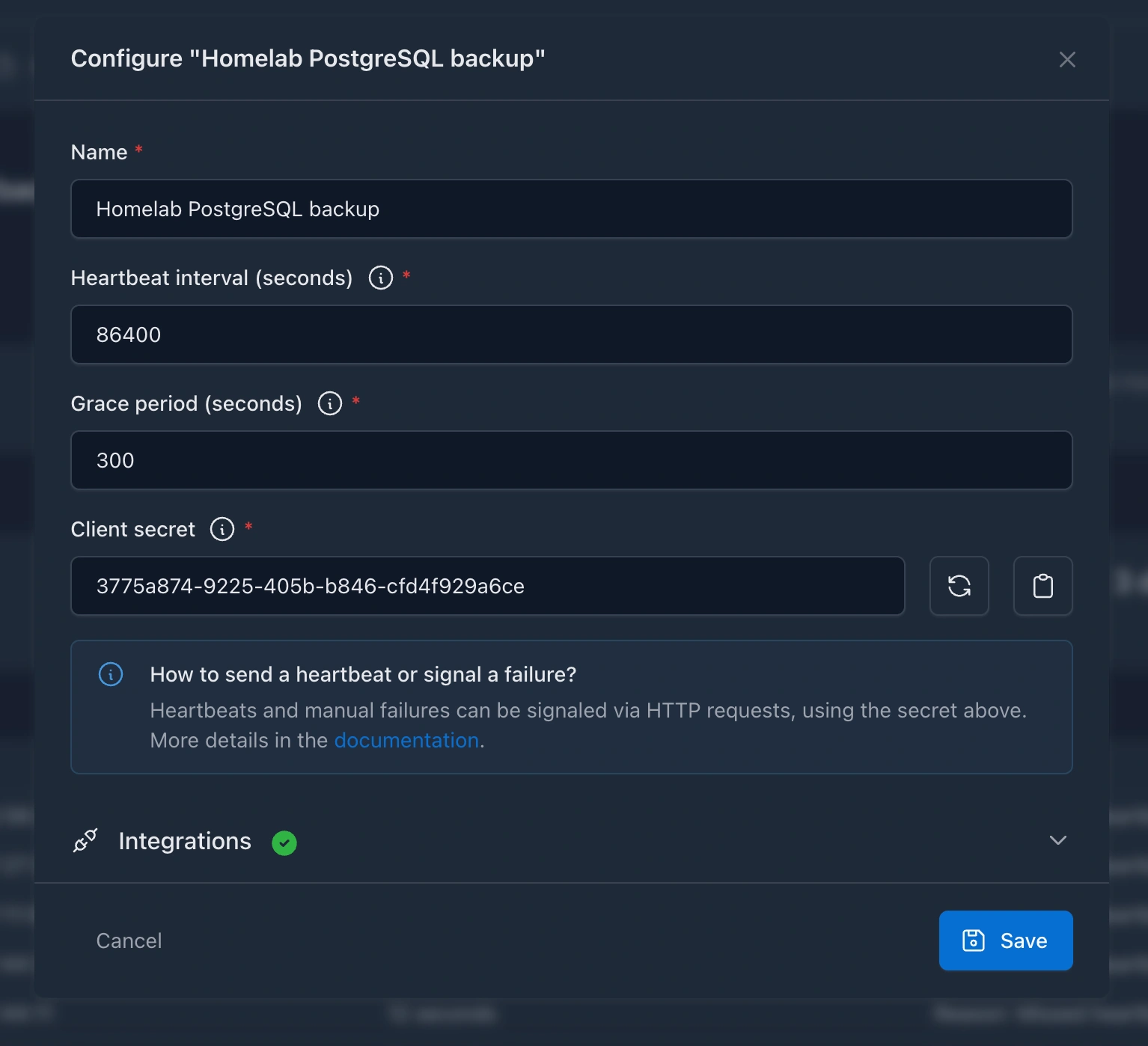
- Push monitors: Also known as cron or heartbeat monitors. You can create monitors to watch your services or scheduled jobs that are not accessible via HTTP, but you still want to keep an eye on them.
Improvements
- The HTTP checks' request and expected headers' names are less restrictive, and also RFC 9110 compliant. Thanks to @LosDrakakos for the contribution!
- Large headers (> 8192 bytes) are handled more gracefully, and they don't end up in false positive uptime errors anymore.
- Documentation: added unofficial deployment guides
- Monitors are completely deletable via
YAML(previously it wasn't possible to distinguish between omitted and empty monitors in the YAML config).
Fixes
- SSL checks are using now a logic that is not bound to HTTP requests, so it's possible to check the certificate of endpoints, that are not accessible via HTTP.
3.1.0 2025-09-23
New features
- Status pages: You can create public and also private, brandable status pages for your monitors, to keep your customers or your own team informed about the status of your services. See the Managing status pages section for more details regarding the configuration options.
Improvements
- Integration names can be totally arbitrary now, the previous restriction of containing only alphanumeric characters, hyphens and underscores has been lifted.
- Added recipes & examples:
- How to use a reverse proxy for the status pages
- How to backup and restore your monitors and status pages
- How to include your custom/private certificates in the Docker image, to be able to monitor endpoints with such certs
- The API docs are having a dedicated site now to make them easier to find and browse.
3.0.2 2025-08-31
Fixes
- Fixed a bug where the historical HTTP uptime stats could contain incorrect values in case a paused monitor's ongoing incident was updated before the requested time range of stats
- Fixed a bug where the monitor-specific incidents were not returned in case of a paused monitor
3.0.1 2025-08-31
Breaking changes
This is a major release that paths the way for new monitor types in the future, by handling the already existing HTTP monitors in a more explicit way. There are a few breaking changes in there, so please refer to the Upgrade notes for more details. Don't be afraid, the upgrade process is straightforward and well-documented, and if you follow the steps, everything should go smoothly.
New features
- Integrations have their own section on the UI now, and they are also exposed under a new API endpoint (
GET /api/v2/integrations). Furthermore, you can test them directly from the UI, or via the API to make sure that they are working as expected, before you would enable them or assign them to monitors. - Update notifications: you can now get notified about new releases of Kuvasz on the UI and through the API on
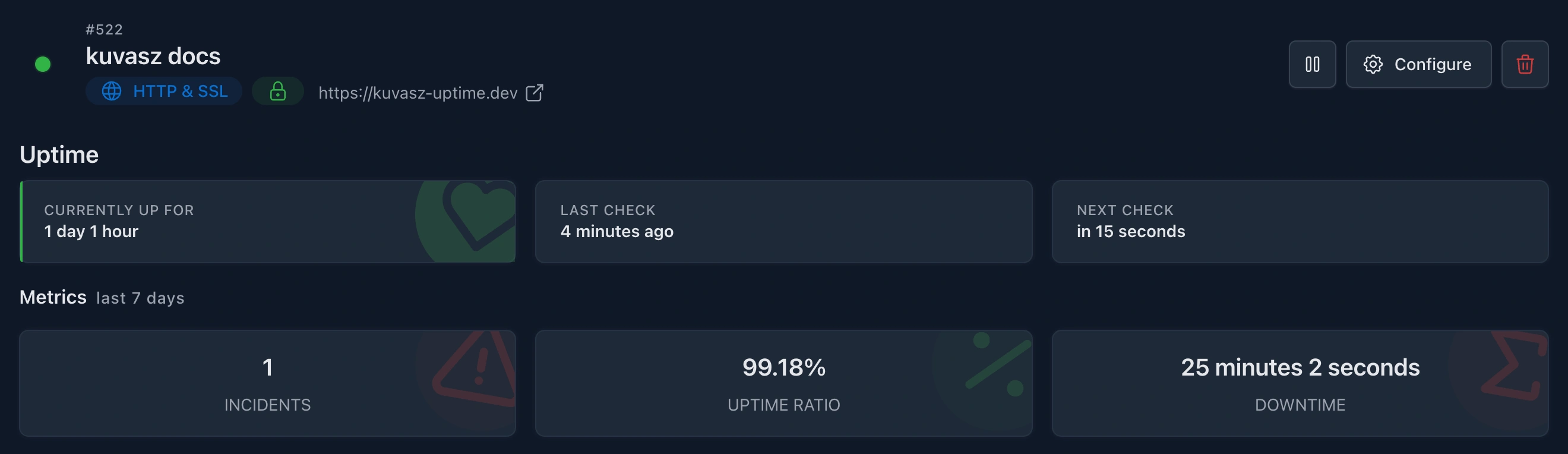
GET /api/v2/settings. This way, it's easier to stay up-to-date with the latest features and improvements. - Monitor-level metrics: the uptime ratio, incident count and total downtime metrics are now available on a per-monitor basis (both on the UI & via the v2 API), not just as cumulated metrics across all monitors.
- Incidents: there is a brand new section on the UI, and a dedicated endpoint under
GET /api/v2/incidentsto see/fetch all your incidents in one single place, where you can also filter them by a monitor, or by a time range.
Fixes
- Clear the expected status code select's search value after selecting an option (by WasixXD)
- Fix the background color of the active option inside the expected status codes select
2.5.1 2025-08-23
Fixes
- Fixed a bug where the historical uptime stats could contain misleading values in case of prolonging incidents that overlap with the requested time range of stats.
2.5.0 2025-08-22
New features
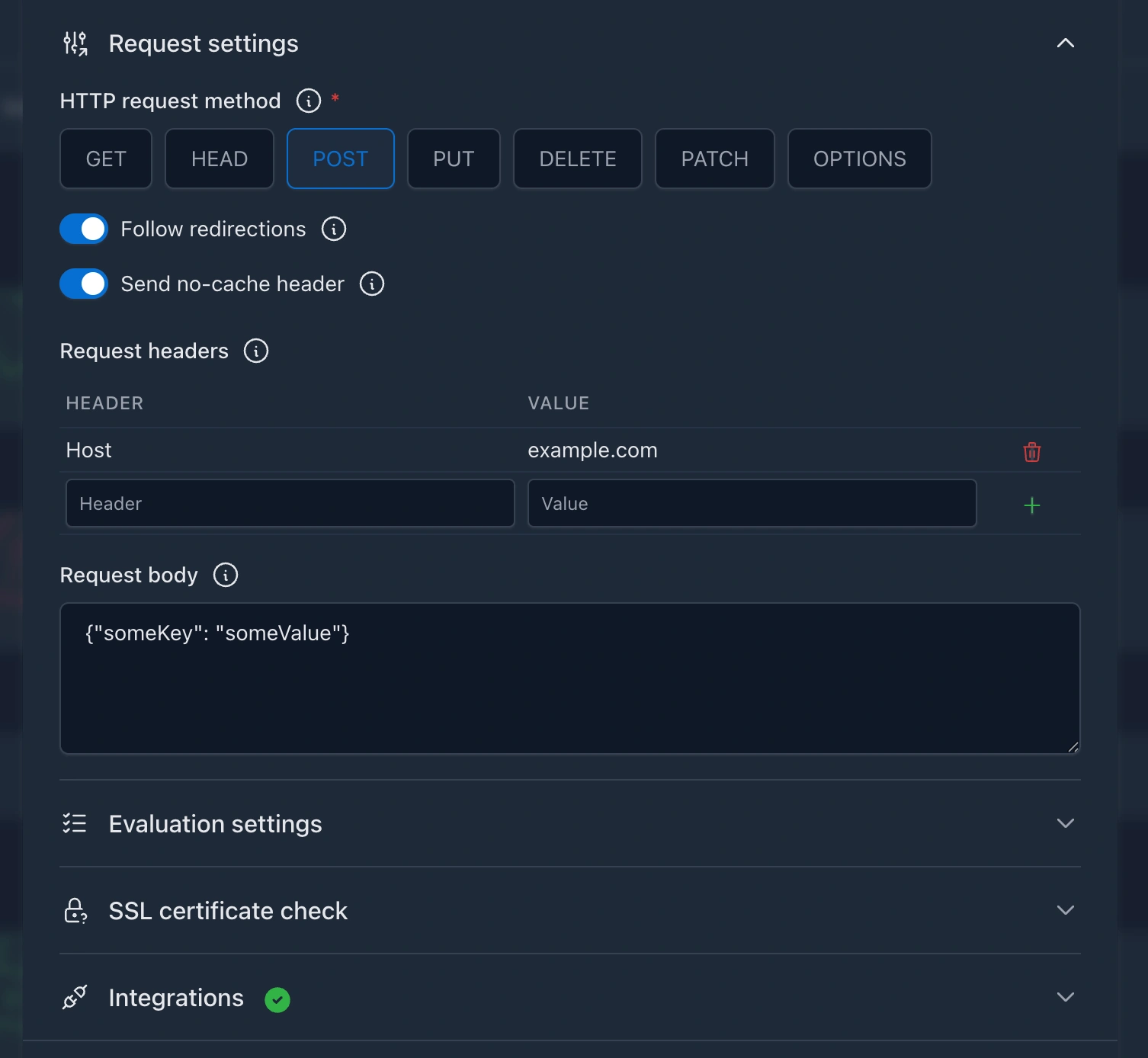
- Custom request headers: you can now specify custom headers to be sent with the HTTP requests, allowing for more flexible and tailored monitoring setups. See the HTTP monitors > Request headers section for more details.
- Custom request body: you can send your own JSON body to the monitored HTTP endpoint, which can be useful for testing APIs that require a specific payload. See the HTTP monitors > Request body section for more details.
- Expected headers: this is a brand new evaluation option that allows you to specify expected headers in the HTTP response. If the response does not contain the expected headers, the monitor will be marked as
DOWN. You can find more details in the HTTP monitors > Expected headers section. - New HTTP request methods:
POST,PUT,PATCH,DELETEandOPTIONSare now supported in addition to the existingGETandHEAD. This allows you to monitor endpoints that require different HTTP methods, such as APIs that expect aPOSTrequest with a specific payload. See the HTTP monitors > Request method section for more details. - Revamped UI for creating and editing HTTP monitors: the UI of the existing modal has been slightly redesigned to make it easier and more convenient to configure HTTP monitors with the new features. The fresh look is hopefully more intuitive and user-friendlier by having a better structure.
2.4.0 2025-08-15
New features
- New HTTP response evaluation options: you can now configure your HTTP monitors to:
- accept only specific HTTP status codes as valid responses
- check for a keyword in the response body, and you can make the check optionally case-sensitive, or also reversed to check for the absence of the keyword
- check the response time against a threshold (in milliseconds) to ensure that the response is not only valid but also fast enough
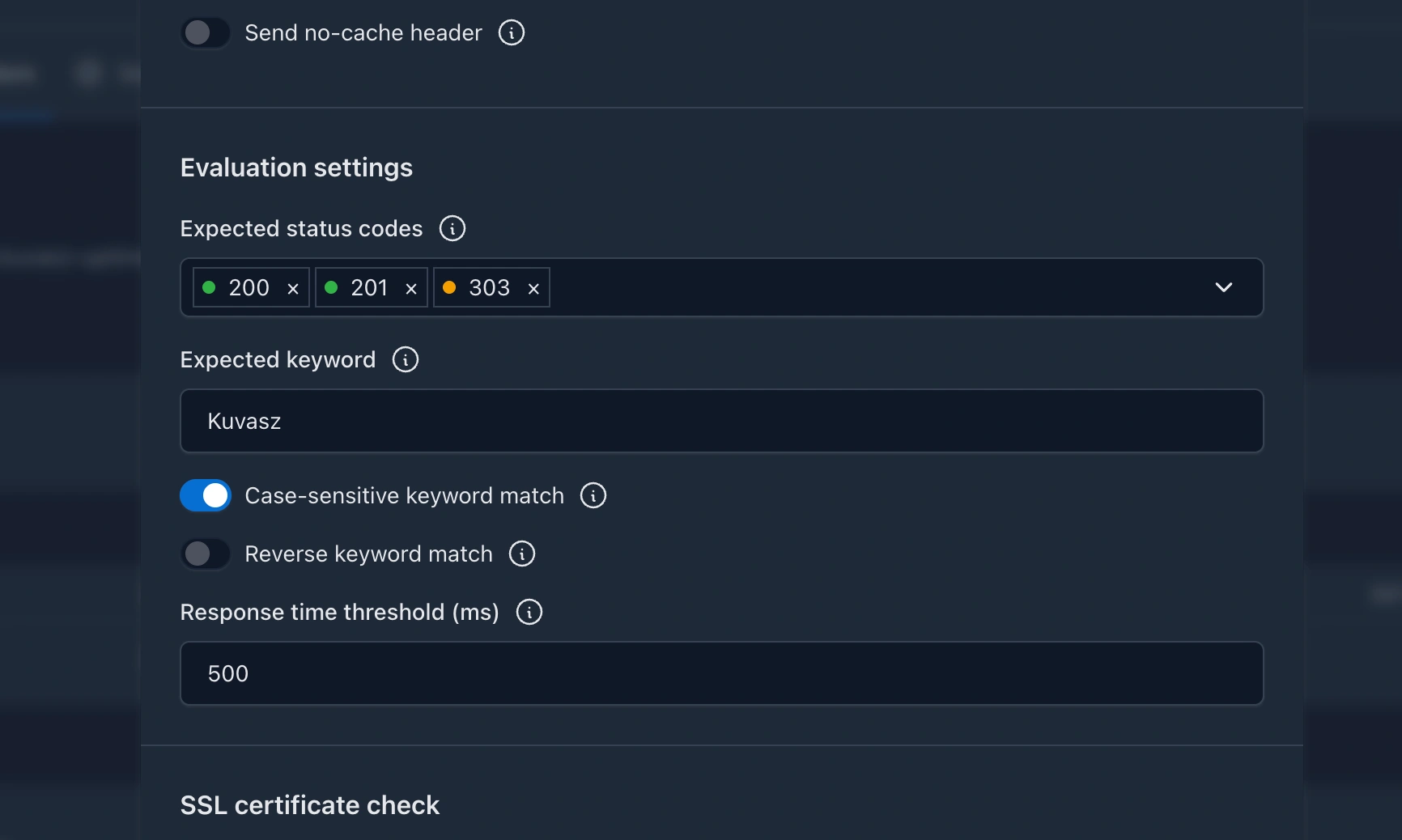
- More details are persisted about the errors that occur during the HTTP uptime checks
- Added French translation, thanks to @waazaa-fr!
- Added Polish translation, thanks to @nkkfs!
- Made the URL on details page clickable, so you can easily open the target URL in a new tab
Improvements
- Re-worked the logic of the HTTP uptime check configuration & evaluation to make it easier to introduce new configuration & evaluation options in the future
- @by-su improved the validation messages around the admin authentication configuration, and also extended the docs to clarify the usage of it, thanks for that!
- Other validation messages have been improved as well, to make them more user-friendly if something goes wrong during the bootstrapping of Kuvasz or during an API request.
- Client-related HTTP response errors are not retried anymore, only the server-related ones. This means practically that 4xx responses will be evaluated as-is without retrying them, while 5xx responses will be retried up to 3 times with an exponential backoff strategy.
Fixes
- Translated the "...[REDACTED]" string to make it internationalization friendly
- Fixed the latency measurement logic to not include the time spent on retrying failing HTTP requests
- Fixed the following CVEs by upgrading 3rd party dependencies:
2.3.1 2025-07-25
Fixes
- Make sure that no deadlocks can occur during the uptime checks by introducing an expiry for every single lock as a fail-safe fallback mechanism
- UI: Align the cards on the settings page better, by not having gaps between them
Chore
- Dependencies: bumped i18n4k to 0.11.0
2.3.0 2025-07-19
Features
- Discord integration: Added support for sending notifications to Discord channels via webhooks. Configure Discord integrations in your YAML file and receive real-time alerts about monitor status changes directly in your Discord server.
2.2.0 2025-07-17
Features
- Metrics exporter settings are exposed both on the API (under
GET /api/v1/settings) and on the UI, so you can easily get an overview of the effective configuration. - A live demo is available at demo.kuvasz-uptime.dev where you can try out the latest features of Kuvasz without setting up your own instance. Further details, credentials here.
Fixes
- Fixed the glitch on the UI regarding read-only mode in case the underlying logic was initialized before YAML monitors were loaded. This caused the UI to not show the read-only mode correctly, even though the backend was working as expected.
2.1.0 2025-07-11
Features
- Metrics exporters: Added support for exporting metrics to OpenTelemetry and Prometheus. See the Metrics exporters section for more details. With this feature, you easily integrate Kuvasz with your existing observability stack. Currently exposed metrics are:
- Uptime status
- Latest latency
- SSL status
- SSL expiry date
- Bearer token authentication: Added support for Bearer token authentication on the API, along with the existing API key authentication. This allows you to use the same authentication mechanism as other modern APIs, making it easier to integrate with your existing systems.
2.0.0 2025-07-02
Breaking changes
- Native image build logic has been removed: Native images will not be supported in the future due to their higher level of unpredictability, and the achieved performance gain/resource saving in exchange is not so significant.
- PostgreSQL 12+ is the minimum supported DB version.
- The HTTP communication log has been removed, because it was an unnecessary overhead in the network pipeline, and a built-in solution is also available now.
- Authentication has been fully reworked, read the Authentication section for more details.
- The latency data (avg, p95, p99) of the monitors are not returned under
MonitorDetailsDto, because a new endpoint is introduced for metrics like this under/api/v1/monitors/{monitorId}/stats - (might be breaking, but not necessarily): SSL validation now takes intermediate certs into account
- The
DELETE /monitors/{monitorId}/pagerduty-integration-keyandPUT /monitors/{monitorId}/pagerduty-integration-keyendpoints are gone, because the PATCH endpoint is now flexible enough to support both use-cases.
Features
- New Monitor attributes (every default value also applies for the existing monitors):
requestMethod:GETorHEAD. The latter is generally faster, but be aware that certain targets might not support it (defaultGET)latencyHistoryEnabled:trueorfalse. If set tofalselatency will be not logged or returned in the monitors' metrics -> Better for a snappier experience on a slow machine (defaulttrue)forceNoCache:trueorfalse. If set totrue, aCache-Control: no-cacheheader will be sent with the request (defaulttrue)followRedirects:trueorfalse. If set totrue, Kuvasz will follow redirects during uptime checks, and the last, non-redirected URL will be evaluated (defaulttrue)sslExpiryThreshold: The number of days before the SSL certificate expires when a notification should be sent.
- Option to disable authentication (useful in a home-lab, for example) via
ENABLE_AUTH.trueorfalse, defaulttrue - Optimization of the check scheduling logic: the first uptime check will be scheduled randomly between 1 second and the configured interval of the monitor to prevent hitting the HTTP client with a lot of requests right after the startup.
- Optimization of the uptime checker:
- Made the error handling more robust by handling exceptions that come from invalid response format (e.g. invalid status code)
- Increased the client's read timeout to 30s
- Added support for non-absolute redirect URLs (a redirect location of
/path/something-elseonhttps://example.comwill be resolved ashttps://example.com/path/something-else - Detect and avoid redirect loops
- Improvement of the
DOWNevent's error formatting both for showing and saving it. Non-visible/printable characters, and long response errors are now sanitised and might be redacted. If the uptime check fails with a standard HTTP status code and a standard error response, then the HTTP status and its name will be the error's "label" (e.g.403 Forbidden) - Initial (i.e. if there is no previous state for a given monitor) UP & VALID states of uptime & SSL checks are not sent to RTC & SMPT event handlers to prevent sending irrelevant notifications upon the first startup
- The latency metrics calculation logic has been optimized to handle large datasets efficiently
- ✨A brand-new Web UI has been introduced, which is more modern, responsive, and user-friendly
- Monitors are configurable via a YAML file besides the UI and the API ("infrastructure as code" way)
- Exposed
nextUptimeCheckandnextSSLCheckon the API - Made
sslValidUntilpersisted on the SSL events, and exposed it on the API sslExpiryThresholdis configurable now on a per monitor basis- Uptime & latency data retention are separetely configurable now
- Made the whole project translatable (the only language set up is English, as of now, but future translations are already super-easy)
- Monitor filtering on the API was greatly improved with new filters:
enabled: Boolean?,sslCheckEnabeld: Boolean?,uptimeStatus: UptimeStatus[]?andsslStatus: SSLStatus[]? - App and integration settings are exposed now both on the UI and on the API (under
GET /api/v1/settings) - Added more latency metrics to
GET /api/v1/monitors/{monitorId}/stats: min, max and p90 - The integration setup has been completely reworked, making it smarter and more flexible. From now on, you can set up multiple integrations per type (Slack, E-mail, etc.) in your YAML config. Then you can make them global (that is in effect for all your monitors without further configuration), or you can assign them on a per monitor basis.
Chore
- Simplified and streamlined the things around jOOQ
- Simplified the logging configuration by moving it to Micronaut's own config file
- Changed the base image to
liberica-runtime-container:jre-17and reduced the compressed image size by ~23% - Build
arm64images too - Bumped the 3rd party dependencies to their latest versions
- Use Java 21
- Switched to a multi-module project layout (should have done it at the beginning 🤦 )
- Switched to kover from JaCoCo
The full changelog is available on GitHub